Kanban
The Best Kanban Boards for Microsoft Teams in 2026

Maya Collins · · 9 min read

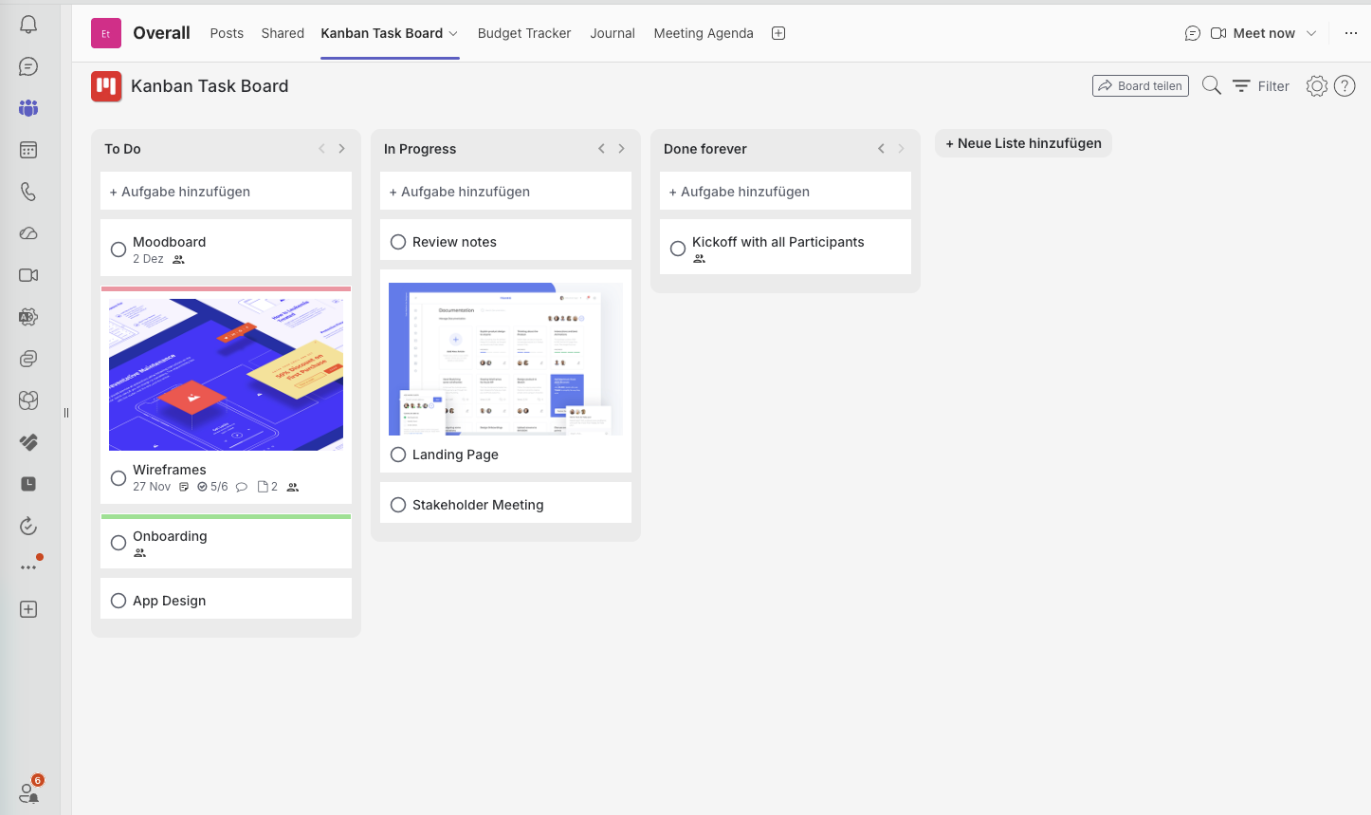
If your team already spends its day in Microsoft Teams, the best Kanban board app is the one that lives inside Teams instead of pulling everyone into another tool. Our pick for 2026 is Kanban Task Board: it installs as a tab in any channel or chat in about a minute, gives every board real WIP limits, and it is free forever for unlimited users. Below is the full ranking, the criteria behind it, and honest notes on when a different tool is the better fit.
How we ranked these Kanban board apps
A Kanban app can look excellent in a demo and still fail in Teams. We weighted the things that decide whether a board is actually used after week two:
- Native Teams experience — does it run as a real tab in channels and chats, or is it an embedded website with a second login?
- Time to first board — how long from install to a usable board with columns and cards?
- Kanban fundamentals — columns, WIP limits, subtasks, labels, filters.
- Collaboration — comments, assignments and notifications that reach people in Teams.
- Cost for a whole team — including whether a free tier is genuinely usable.
- Migration path — can you move existing Planner or Trello work across without a project plan?
- What Teams admins and users actually rate it — the star rating on each app's Microsoft commercial marketplace listing.
About those ratings: all star values below come from each app's own listing on the Microsoft commercial marketplace (AppSource), read in August 2026, and they move as new reviews arrive. Read them with the size of the listing in mind: a high average from a focused Teams app is strong evidence, but not the same kind of evidence as a high average across a whole platform, and a low average on a huge listing often reflects the wider product rather than its Teams app. Browse the Microsoft marketplace
Kanban boards for Microsoft Teams at a glance
| Tool | Marketplace rating | Native Teams tab | WIP limits | Free tier | Best for |
|---|---|---|---|---|---|
| 1. Kanban Task Board | 4.9 | Yes | Yes | Free forever, unlimited users | Teams-first collaboration |
| 2. Microsoft Planner | 3.8 | Yes | No | Included in M365 | Simple task lists |
| 3. Trello | 3.6 | Partly | Via Power-Up | Yes | Small, informal boards |
| 4. Jira | 4.1 | Partly | Yes | Up to 10 users | Software delivery |
| 5. Azure Boards | 3.5 | Partly | Yes | Up to 5 users | Dev teams already on Azure DevOps |
| 6. Asana | 2.6 | Partly | No | Yes | Task-heavy marketing teams |
| 7. monday.com | 4.8 | Partly | Limited | 2 seats | Portfolio dashboards |
Tool
Marketplace rating
4.9
Native Teams tab
Yes
WIP limits
Yes
Free tier
Free forever, unlimited users
Best for
Teams-first collaboration
Tool
2. Microsoft Planner
Marketplace rating
3.8
Native Teams tab
Yes
WIP limits
No
Free tier
Included in M365
Best for
Simple task lists
Tool
3. Trello
Marketplace rating
3.6
Native Teams tab
Partly
WIP limits
Via Power-Up
Free tier
Yes
Best for
Small, informal boards
Tool
4. Jira
Marketplace rating
4.1
Native Teams tab
Partly
WIP limits
Yes
Free tier
Up to 10 users
Best for
Software delivery
Tool
5. Azure Boards
Marketplace rating
3.5
Native Teams tab
Partly
WIP limits
Yes
Free tier
Up to 5 users
Best for
Dev teams already on Azure DevOps
Tool
6. Asana
Marketplace rating
2.6
Native Teams tab
Partly
WIP limits
No
Free tier
Yes
Best for
Task-heavy marketing teams
Tool
7. monday.com
Marketplace rating
4.8
Native Teams tab
Partly
WIP limits
Limited
Free tier
2 seats
Best for
Portfolio dashboards
1. Kanban Task Board — best Kanban board app for Microsoft Teams
Kanban Task Board was built for Teams first rather than ported into it. You add it as a tab to a channel or a group chat, name your columns, and the board is live for everyone with access to that channel — no separate accounts to provision, no invitations to chase, no context switch to a browser tab nobody keeps open.
That single design decision fixes the most common reason boards die: people stop visiting them. When the board sits next to the conversation about the work, updating a card costs a few seconds.
- Unlimited boards, one per channel, project or workstream
- Real WIP limits that warn when a column is overloaded
- Subtasks you can sort and assign to individual team members
- Labels, due dates and assignees on every card
- Comments that reach people right inside Teams
- Automations to move cards as work progresses
- Free forever for unlimited users, so the whole team can join
- Works in the Teams desktop app, mobile app and the browser
Trade-offs, honestly: it is a focused Kanban app, not an enterprise portfolio suite. Structure comes from columns, labels and filters rather than deep hierarchies, and there is no resource-levelling across dozens of departments, no Gantt-driven contract management and no full agile programme framework. If you need those, look at Jira or monday.com. What you do get is a free-forever tier for unlimited users, so nothing blocks the whole team from starting today. It is also the highest-rated app in this comparison on the Microsoft marketplace: 4.9 out of 5.
2. Microsoft Planner — the default you already own
Planner ships with Microsoft 365 and integrates cleanly with Teams, so it is the easiest tool to justify. For a small team that needs buckets of tasks with assignees and due dates, it is enough. Its marketplace rating sits at 3.8 stars — respectable, but below the dedicated Kanban apps at the top of this list.
Where it runs out of room: Planner is simply harder to use than it looks. Plans, buckets and tasks are spread across Teams, Outlook and the Planner app, so nobody is sure where the truth lives. Add missing WIP limits, thin card structure and reporting that stops at charts, and most teams outgrow it within a quarter — that is exactly the gap Kanban Task Board fills, and our migration notes are further down.
3. Trello — familiar, but a guest outside Teams
Trello remains the friendliest Kanban board app to learn, and its free tier is generous. Inside Teams it works as an embedded app, which means a second account per person and permissions maintained in two places. WIP limits require a Power-Up. Good for informal boards; awkward as the system of record for a Teams-based organisation. Its Teams listing rates 3.6 out of 5.
4. Jira — the right answer for software delivery
If your work is code, Jira's Kanban boards, backlogs and cumulative flow reporting are hard to beat, and the Teams integration surfaces notifications well. The cost is complexity: configuration effort, a vocabulary non-engineers do not enjoy, and admin time. Wrong tool for marketing, HR or operations boards. Marketplace reviewers give the Teams app 4.1 out of 5.
5. Azure Boards — sensible if you are already on Azure DevOps
Azure Boards gives you Kanban with WIP limits and full traceability into repositories and pipelines. It is a natural fit for engineering groups already living in Azure DevOps and a poor fit for everyone else — the interface assumes a development lifecycle. Its marketplace rating of 3.5 out of 5 reflects that narrow fit.
6. Asana — strong task management, light Kanban
Asana's board view is polished and its rules engine is genuinely useful for repeatable processes. It is task management with a Kanban view rather than a Kanban system: no true WIP limits, and flow metrics are shallow. Teams integration is functional but keeps discussion inside Asana. It is the weakest rated Teams app here at 2.6 out of 5, while Asana's own marketplace listing sits at 4.6 — a gap that says more about the integration than the product.
7. monday.com — best for portfolio visibility
monday.com shines when leadership wants dashboards across many projects, and the board view handles Kanban adequately. Pricing scales in seat tiers, the free plan stops at two users, and the Teams app is a window into monday rather than a Teams-native board. Its marketplace listing is strongly rated at 4.8 out of 5, though those reviews cover the whole platform, not the Teams board.
Why Kanban Task Board takes first place
Every tool on this list can render three columns. The ranking comes down to friction. Kanban Task Board wins on the four things that decide adoption in a Microsoft Teams organisation:
- 1Zero onboarding tax — access follows Teams membership, so there is no separate user directory to maintain.
- 2Kanban done properly — real WIP limits plus subtasks you can sort and assign individually, built in rather than bolted on.
- 3Conversation and work in one place — cards are discussed where decisions are already being made.
- 4Free forever for unlimited users — no seat maths, no procurement round, so adoption never stalls on budget.
Moving from Microsoft Planner to a real Kanban board
Most teams reading this are not starting from zero — they are outgrowing Planner. The move is usually small: pick the one project that hurts most, recreate its buckets as columns, add a WIP limit to the busiest column, and run both for a sprint. Almost nobody goes back, because the WIP limit alone surfaces the bottleneck that Planner was hiding.
Keep the old Planner plan read-only for a few weeks instead of deleting it, and archive it once the board has a full cycle of history.
Frequently asked questions
Does Microsoft Teams have a built-in Kanban board?
Not a full one. Teams includes Planner for task lists in buckets, which looks board-like but has no WIP limits and no way to control flow. For real Kanban you add a dedicated app such as Kanban Task Board as a tab.
Is there a free Kanban board app for Microsoft Teams?
Yes. Kanban Task Board has a free-forever plan with unlimited users, so an entire team can run real boards with WIP limits without paying anything. Planner is included with most Microsoft 365 plans and Trello also has a free tier.
How many Kanban boards should a team have?
One per stable workflow, not one per project. A single board per channel, with labels and filters for projects, usually beats a dozen half-abandoned boards.
Can a Kanban board replace status meetings?
It can replace the reporting part of them. When the board is current, the meeting shifts from listing what everyone did to unblocking whatever is stuck in the overloaded column.
Written by
Maya Collins
Maya Collins helps distributed teams streamline their workflows with practical Kanban systems and lightweight agile processes. She writes about collaboration, removing bottlenecks, and building work routines that survive a busy quarter.